



Do you want your content to achieve strong rankings in SERPs? Make sure your content is properly linked to maximise visibility and search engine indexing.
In SEO (Search Engine Optimisation), a link, also known as a hyperlink, is a connection between two web pages that allows users (and search engines) to navigate from one page to another. But, Link Structure isn’t just about hyperlinks. It’s a blueprint of how authority, relevance, and crawlability flow through your site. For high-performance SEO, understanding and optimising your internal and external link structures is non-negotiable.
In this advanced guide, we’ll break down complex link analysis strategies, cover real-world examples, and arm you with actionable techniques used by enterprise-level SEO teams. Before that, let’s delve into the types of links that we deal with in SEO.
Types of Links in SEO:
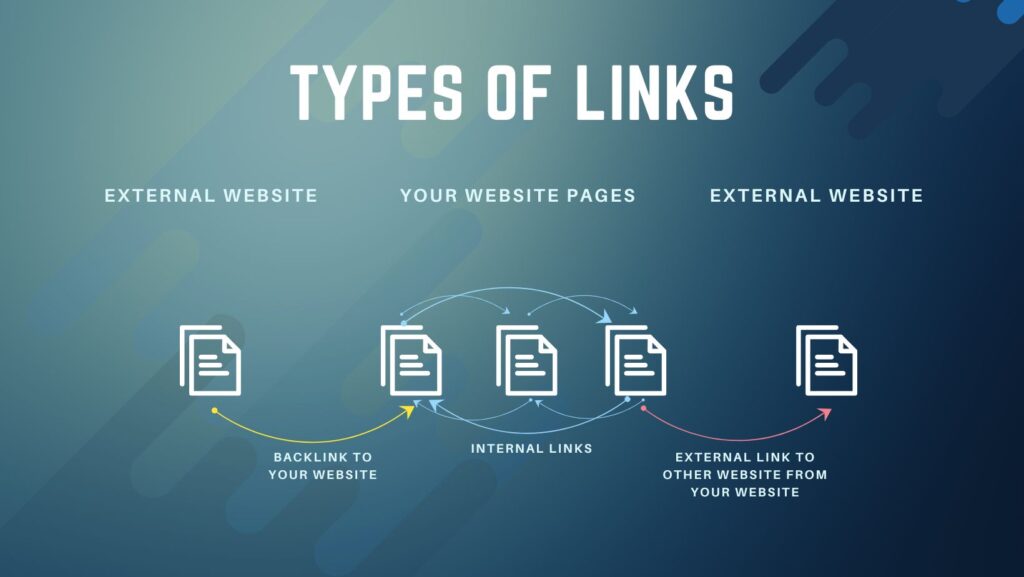
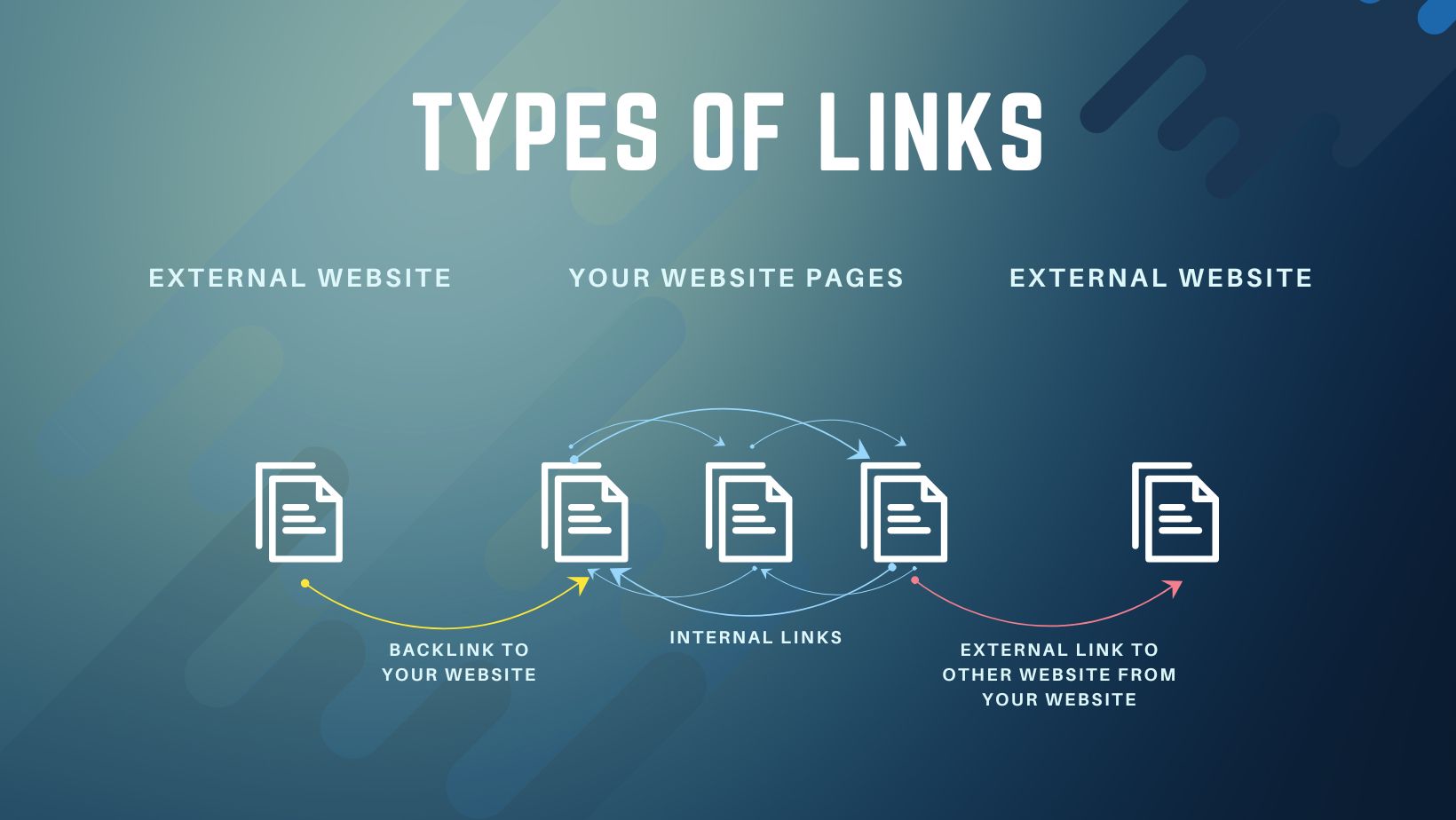
Internal Links: Links that connect one page to another within the same website
- Definition of internal links: Internal links are hyperlinks that connect one page of your website to another page on the same site. Both users and search engines rely on these links to navigate and discover content.
- Purpose of internal links:
- Help users navigate your site
- Distribute page authority
- Help search engines crawl and understand site structure
- Example of internal links: A blog post that links to another related article on the same site. There are also different types of internal links, including those in menus, footers, and within the content itself.
- Contextual links are those placed within your content and help guide users to related information and show search engines how your content is connected.
Tips: The more internal links a page receives, the more important it appears to search engines. That’s why a strong internal linking strategy is essential for effective SEO.
External Links (Outbound Links): Links that point from your website to a different website
- Definition of external links: External links are hyperlinks that point from your website to a different domain. They help users explore additional information and provide search engines with context about your content.
- Purpose of external links:
- Provide additional value or references to users
- Build credibility when linking to high-quality sources
- Example of external links: Linking to a Wikipedia article or a trusted industry site
Tips: Linking to high-quality, authoritative sources builds trust and credibility. It also signals to search engines that your content is well-researched and connected to relevant topics across the web. While overusing external links can distract users, using them strategically supports both user experience and SEO performance.
Backlinks (Inbound Links): Links from other websites that point to your site
- Definition of backlinks: Backlinks are links from other websites that point to your website. They act as endorsements, telling search engines that your content is valuable and trustworthy.
- Purpose of backlinks:
- Act as a vote of confidence
- Improve domain authority and search rankings
- Example of backlinks: A news website links to your blog in an article.
Tips: The more high-quality backlinks you earn—especially from authoritative or relevant sites—the more likely your pages are to rank higher in search results. Backlinks are one of Google’s strongest ranking signals. Not all backlinks are equal. Links from spammy or unrelated sites can harm your SEO, while links from respected domains can significantly boost your site’s authority.
Why Links Matter in SEO:
Google is more effective at discovering your pages and posts when they’re connected through links, especially those found across the web. Internal linking plays a key role here, as it helps tie your content together and provides search engines with a clear picture of your site’s structure. It also helps build a hierarchy, allowing you to pass more link value to your most important content while de-emphasising less critical pages. When done correctly, internal linking can significantly enhance your SEO performance. In this article, we’ll explore why internal links matter, how to implement them effectively, and how tools like Yoast SEO can support your internal linking strategy. In short, Links matter in SEO for the following reasons:-
- Crawling & Indexing: Search engine bots follow links to discover and index content.
- Page Authority Distribution: Internal linking helps distribute ranking power (link equity) across your site.
- Ranking Signals: Backlinks from authoritative sources are one of Google’s strongest ranking factors.
- User Experience: Well-placed links improve navigation and keep users engaged.
What Is Link Structure Analysis?
In our SEO Checklist for a new website, we emphasised Link Structure Analysis before proceeding with implementing general SEO tactics. It is important that one should evaluate how hyperlinks, both internal (within your site) and external (from/to other domains), are organised, distributed, and function across a web architecture.
The things an SEO expert should consider for Link Structure analysis are:
- How link equity (aka PageRank) flows
- Which pages are orphaned
- Crawl depth and link hierarchy
- Link clustering and siloing
- Redirect loops and broken link chains
- Anchor text optimisation
- JavaScript-rendered links and crawlability issues
Key Concepts in Advanced Link Structure Analysis:
1. Crawl Depth and Link Hierarchies
Pages buried 4 or more clicks deep from the homepage tend to receive less crawl budget and lower authority.
Example: Homepage (Depth 0) > Category (Depth 1)> Subcategory (Depth 2)> Article (Depth 4) implies the Article is 4 levels deep
Action: Use breadcrumb links and sidebar navigation to reduce depth. Restructure navigation so that your most important commercial pages are within 2-3 clicks of the homepage.
Know more about Concepts and Key Terms of Crawling in SEO
2. Orphaned Pages (No Internal Links)
An orphaned page has no internal links pointing to it. Even if it’s in your sitemap, it may not be discovered or ranked well.
Example: An old blog post from 2021 is updated in 2025, but it lacks internal links from the new content. It remains invisible.
Action:
- Use Screaming Frog to identify orphaned URLs.
- Create contextual internal links from relevant pages to revive them.
3. Link Clustering and Siloing
Topic silos help organise related content by linking them internally in a structured, thematic way.
Example: You have a silo on “Technical SEO”:
- /technical-seo/
- /technical-seo/page-speed/
- /technical-seo/structured-data/
- /technical-seo/javascript-seo/
Each page links to others in the silo, creating a strong topical signal.
Action: Map your site into silos and interlink related pages to signal authority within each topic.
4. Internal PageRank Sculpting
Even though Google downplays manual PageRank sculpting, internal linking still affects authority flow.
Strategy:
- Identify high-authority pages (e.g., blog posts with more backlinks from high-value external websites/pages).
- Add internal links from those pages to underperforming commercial pages.
Example: If /best-seo-tools-2025 has backlinks from Moz and Search Engine Journal, link from it to /seo-audit-services.
5. Broken and Redirect Chains
Too many redirect hops (301 → 301 → 200) dilute authority and reduce crawl efficiency.
Example:
- /services → /our-services → /seo-services (3 hops)
Action:
- Use Screaming Frog’s “Redirect Chains” report.
- Flatten chains to a single 301 redirect.
Note: Broken links (404s) drain authority from your internal structure. Always fix or redirect them.
6. Anchor Text Optimisation
Anchor text diversity and relevance impact the contextual value of the link.
Example:
- Over-optimised: “best affordable SEO services in New York”
- Natural: “our SEO services”
Action:
- Use partial match or branded anchors.
- Avoid repeating exact-match anchors across multiple pages.
7. JavaScript and Hidden Links
If your links are rendered via JavaScript (e.g., dropdown menus, accordion elements), bots may miss them.
Example: A single-page application (SPA) uses onClick handlers to load content, but search engines fail to follow.
Action:
- Use server-side rendering (SSR) or hydration frameworks like React with pre-rendering.
- Check rendered HTML using Google Search Console’s URL Inspection Tool or Screaming Frog’s JS rendering mode.
Final Thoughts
Link structure analysis isn’t a one-time task—it’s an ongoing discipline. In large or complex sites, even small changes can have an exponential impact on SEO performance. Use an internal link analyser to find out what your website pages require for a better link structure to rank in the SERPs.



Leave a Reply