




In my earlier blog post, I provided you with a list of Technical SEO Checklist to follow. But merely knowing the names of the terms won’t help you. You need to know in details what they are and how you are going to take care of the issues that crop up while doing your search engine optimization for a website.
A UI/UX SEO audit is a deep analysis of a website or application to identify areas that are causing users to leave.
What is UX?
UX or User Experience is the feeling or reaction of a person about using a product or service.
Case 1. You are interacting in a Facebook group, and from there, you opened a website by clicking on the given link. You find it so useful and well-designed that you share it with your friend immediately. You bookmark that page. This is an example of a good UX.
Case 2. You open a web page and you do not find it useful, the website has with outdated design, odd fonts, poor content quality and due slow to loading speed. You’re frustrated within 30 seconds, close the tab and start exploring new websites. This is an example of a bad UX.
User Experience (UX) Factors
A proper User interface helps the visitor to find the required information, and a blissful user experience assists in starting an interaction with the potential customer. SEO and UI/UX are dynamic partners in attracting customers to the website.
- Silo Structure of the Website:- A silo structure in a website refers to a method of organising content into distinct categories (or silos) to improve navigation, SEO, and user experience. It helps search engines and users understand the hierarchy and relationships between different pages on the site.
- Visibility: Above and below the fold:- The concept of above and below the fold originates from newspaper design, where the most important news was placed on the top half of a folded newspaper to grab attention. In web design, this refers to how content is displayed on a webpage before and after scrolling.
- Mobile Responsiveness:- Mobile Responsiveness refers to a website’s ability to adapt and provide an optimal viewing experience across different screen sizes, especially on mobile devices like smartphones and tablets. A mobile-responsive website automatically adjusts its layout, images, and content to ensure usability and readability. Find out whether the website is optimised for all devices.
- Ease of Navigation:- Ease of Navigation in a website refers to how simple and intuitive it is for users to find the information they need without frustration. A well-structured navigation system enhances user experience, reduces bounce rates, and improves conversions. Can users find what they need quickly?
- Loading Speed:- Loading speed refers to the time it takes for a webpage to fully display its content after a user requests it. It is a critical factor for user experience, SEO, and conversion rates. Does the site load within 3 seconds?
- User Flow & Journey:- User Flow refers to the path a user takes on a website or app to complete a specific task, such as signing up, making a purchase, or finding information. It includes entry points, interactions, and exit points. User Journey is the broader experience of a user, covering multiple touchpoints across different channels (website, email, social media) before achieving a goal. It considers emotions, motivations, and pain points. Are users guided effectively through the website?
- Accessibility:- Website accessibility ensures that all users, including those with disabilities, can easily navigate, understand, and interact with a website. It involves design, coding, and content practices that accommodate visual, auditory, motor, and cognitive impairments.
- Personalisation:- Website personalisation is the practice of tailoring content, recommendations, and user experiences based on individual preferences, behaviour, and demographics. It enhances engagement by showing relevant information to each visitor. Does the website adapt based on user behaviour?
What is UI?
UI or User Interface is the point of interaction between a human and an electronic device like a computer, mobile, tablet, touch-screen display, etc. Better UI improves UX. Some websites like Airbnb and Pinterest focus on users and improve their UI repeatedly.
User Interface (UI) Factors
- Visual Hierarchy:- Visual hierarchy is the arrangement of elements on a webpage to guide users’ attention based on importance. It uses size, colour, contrast, spacing, and positioning to prioritise content and improve readability. Is important information displayed prominently?
- Consistency in Design:- Consistency in design ensures that visual and functional elements remain uniform across a website or app. This includes typography, colours, buttons, spacing, and navigation, creating a seamless user experience and reinforcing brand identity. Are fonts, colours, and UI elements consistent?
- CTA Placement:- CTA (Call-to-Action) placement refers to strategically positioning buttons or links that prompt users to take desired actions, such as “Sign Up,” “Buy Now,” or “Learn More.” Effective placement boosts engagement and conversions. Are call-to-action buttons visible and compelling?
- Whitespace Usage:- Whitespace, also known as negative space, refers to the empty areas around and between elements on a webpage. It improves readability, reduces visual clutter, and helps highlight important content, enhancing the overall user experience. Does the design feel clean and uncluttered?
- Typography & Readability:- Typography refers to the style, arrangement, and appearance of text, while readability focuses on how easily users can read and understand the content. Good typography ensures the text is legible, visually appealing, and aligned with the brand’s voice, while readability ensures the font choice, size, and spacing are optimised for a smooth reading experience. Is text legible and easy to scan?
Content & SEO Factors
- Above-the-Fold Engagement:- It is about ensuring that this area captures users’ attention instantly and provides a compelling reason to stay and explore further. Does the content hook users instantly?
- Content Readability:- Content readability refers to how easy it is for users to read, understand, and engage with the content on your website. For content to be effective, it should be concise, informative, and engaging, keeping the user’s attention while providing value. Is the content concise, informative, and engaging?
- Keyword Optimisation:- Keyword optimisation refers to the strategic use of relevant keywords throughout your content to improve search engine rankings and ensure users find the information they’re looking for. The key is to incorporate keywords naturally, without overstuffing, so that the content remains readable and valuable. Are relevant keywords incorporated seamlessly?
- Internal Linking:- Internal linking refers to the practice of linking to other pages or content within your own website. It helps guide users to explore related content, keeps them engaged, and improves the site’s overall SEO by distributing link equity across pages. Are users guided to explore related content?
- Metadata & Alt Text:- Metadata refers to the data about your content that helps search engines and users understand its context without viewing the actual page. It includes elements like title tags, meta descriptions, and keywords. Alt text (alternative text) is used to describe images on your website. It helps improve SEO and provides accessibility for users with visual impairments by reading the description aloud via screen readers. Are images and pages optimised for search engines?
Conversion Optimization
- Clear Value Proposition:- A value proposition is a statement that clearly communicates the unique benefits and value that a product, service, or website provides to its users. It answers the crucial question: “Why should the user choose this over others?” A well-defined value proposition is essential for drawing visitors in and converting them into customers or engaged users. Does the site communicate its purpose effectively?
- Forms & Checkout Process:- An intuitive and frictionless checkout process and simple forms are essential for reducing user frustration, improving conversions, and enhancing the overall user experience. Both should be designed to make completing tasks as easy and quick as possible. Are forms simple, and is checkout frictionless?
- A/B Testing:- A/B testing (also known as split testing) is a method of comparing two versions of a webpage, email, or other digital content to determine which one performs better. By testing variations of key elements, you can optimize your website or campaign for better user engagement, conversions, or other desired outcomes. Are different UI elements tested for better performance?
- Trust Signals:- Trust signals are elements on a website or digital platform that help build confidence with users by reassuring them that the website is reliable, safe, and reputable. Trust signals are crucial for increasing conversions, especially on e-commerce websites, subscription-based services, or any site where users need to share personal or payment information. Are reviews, testimonials, and security badges visible?
Analytics & Performance Tracking
- Bounce Rate & Dwell Time:- Both Bounce Rate and Dwell Time are crucial metrics in measuring how users interact with your website. They provide insights into the quality of your content and user experience. Dwell Time refers to the amount of time a user spends on a page before returning to the search engine results or moving to a new page. It is essentially the duration a user stays on your page and actively interacts with it. Are users staying on the site?
- Heatmaps & Click Tracking:- Heatmaps and Click Tracking are powerful tools used in web analytics to visualize how users interact with your website. These tools help understand user behavior, identify areas of interest, and optimize design for better user engagement and conversions. Where are users engaging the most?
- Traffic Sources:- Traffic sources refer to the different channels or origins through which visitors find and access your website. Understanding your traffic sources helps you identify the most effective marketing strategies, optimize resources, and tailor your content and campaigns to your audience. Are marketing campaigns driving relevant traffic?
- Conversion Funnel Analysis:- Conversion Funnel Analysis refers to the process of examining the stages that users go through on their journey to completing a desired action on your website (such as making a purchase, signing up for a newsletter, or downloading an app). Understanding the funnel helps you identify bottlenecks, optimize user experience, and ultimately improve conversion rates. Where do users drop off in the journey?
Why we need a UI/UX SEO Audit?
Users come to the site, explore one or two pages and suddenly drop off without accomplishing your conversion goal. There may be a fault in your UI or UX design. You need to improve the user experience by providing a better user interface. To find out the improvement areas in your application or website, you need a UI/UX audit.
What are the key elements of a UI/UX SEO audit?
- You have a clear understanding of your website goals.
- You should be aware of the latest trends, technology, devices, and competition.
- You should be ready to take feedback from existing or target customers.
- You need to check your website’s structure, navigation, visualisation, appearance,
theme, colour combinations, layout, etc. - Examine the font size and readability, character spacing, line-height distance, etc.
- Look at the button size and margins, navigation bar in the mobile view.
- Check the responsiveness of your website.
- Duplicate content or content with keyword stuffing can affect the user experience.
- You need to check the grammatical mistakes in your content.
- Check the readiness of your website for differently-abled persons.
- Are the input sections working? Are the users able to send you their grief or
happiness?
How do you conduct a UI Audit?
There are several UI points on which a UI expert or a UI UX Audit agency works. Few of
them are listed below:
- Button styles. Do they have the same size or unequal sizes?
- Button Colours. Are the colours of the buttons matching with website theme colours or not?
- Links functionality. Are the links working properly, and have equal padding from other
links or elements? - Form elements. Form elements like a radio button, drop-down list boxes, etc. Designed properly or not?
- Theme colour combinations.
- Elements overlap or do not.
- Elements are too far or too close together.
How do you conduct a UX Audit?
The key to a good UX SEO audit is to keep a few important questions in mind whilst auditing your site and your competitors’ sites:
- What information and functionality would a searcher need to fully satisfy the intent of
- The search that brought them here?
- By searching this keyword, what is the searcher trying to achieve/what action are they looking to take?
- How do the top-ranking pages for the keyword in the question above help me achieve
those goals/take those actions? - Is this page so great that I would send it to my friends/recommend it to someone also interested in the topic/search?
- If the answer to the question above is yes, why?
- What makes this page better than the other ones ranking below it?
- Would an individual (not a search engine bot/spider) really enjoy using and trust this website?
An example of the kinds of inspiration and insights you can get from UX SEO audits would be the following features from this Argos product page.
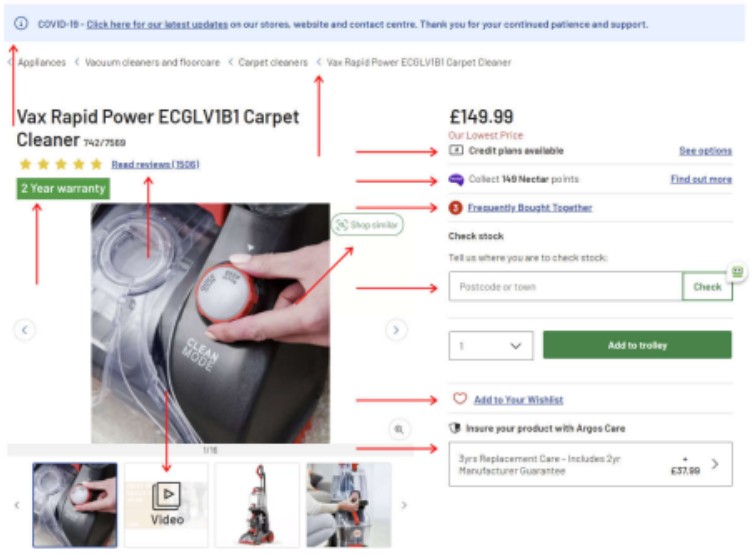
- Clear, concise information on COVID-19 and how it could affect orders.
- Breadcrumb links allow users to jump back to category pages if they want to search for other products.
- Jump links to the product reviews, which will be important to potential buyers. 4. Information on the warranty provided.
- High-quality images and even a video demonstrating the product.
- Financing and credit details.
- Loyalty points details/information.
- Frequently bought together products that might be of interest to shoppers. 9. A stock checker for those users who would rather collect in-store/not order online. 10. Comparison functionality for those users who haven’t quite made up their mind on what they’re looking for.
- Wishlist functionality for those who aren’t ready to buy yet but might want to refer to the page later.
- Insurance and guarantee information.
- Downloadable PDF document with product details for those who want to buy later.
- Further product information and details, within a different section/dropdown to make the content more digestible.
- Relevant reviews for this specific product are verified by a third party, so users are better able to trust them.
- Questions were asked about the product, and detailed answers to them.
- Other recommended products relevant to this one.
- Clear information on the shop’s return policy.
- Details on what payment methods can be used.
- Details on where users can find more help/ask questions.
- Multiple requests for feedback so they can make further UX improvements that will benefit users, conversions and rankings in the future.
The bare minimum for keywords related to this product would have been a page with the relevant keywords in the meta title and heading, a short product description, product images and a buy button.
All of the points above take things one step further and collectively allow Argos to offer a UX significantly better than some of their competitors.
These efforts could be helping not only this page rank, but when applied across their thousands of other product pages, the whole site performs stronger in the search results.
In today’s digital landscape, a seamless and user-friendly interface is paramount to the success of any website or application. A thorough UI/UX analysis not only ensures that your design is visually appealing but also guarantees that it meets the needs and expectations of your users. By focusing on key elements such as usability, accessibility, mobile responsiveness, performance, and user behaviour, businesses can enhance the user experience, improve engagement, and ultimately drive higher conversion rates.

Leave a Reply